Table of Contents
- Is a Self-Checkout Kiosk for a Small Retail Store Worth It?
- Why Self-Checkout Is Trending Right Now
- The Real Costs and the Payback Math
- Where Kiosks Shine: C-Stores, Grocery, and Dollar Stores
- Age-Restricted Sales and the ID Verification Question
- Making the Kiosk Actually Take Money
- Theft, Shrink, and Keeping the Human Touch
- How to Roll Out a Kiosk Without Disrupting Your Store
- Frequently Asked Questions
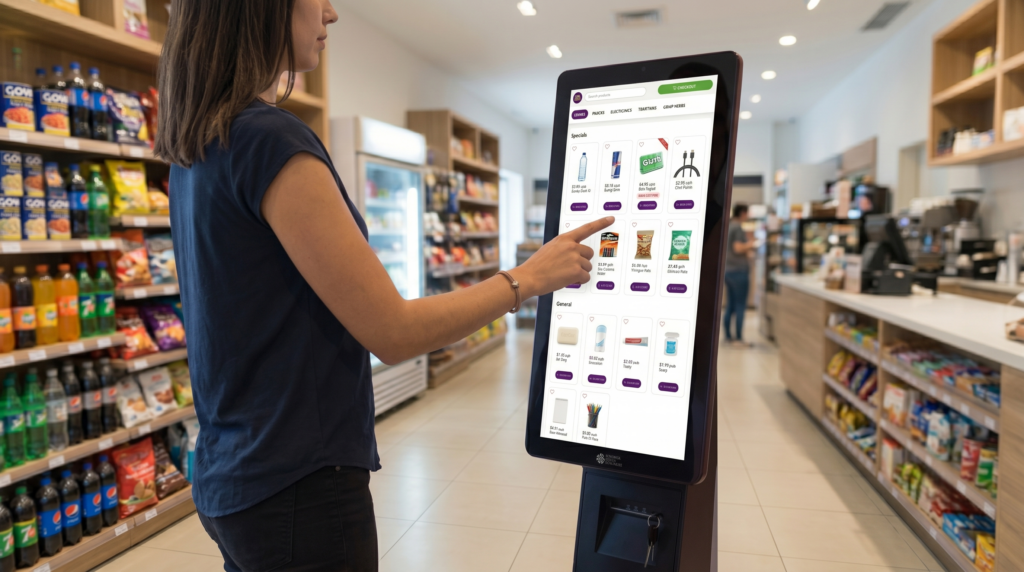
Lines at the register cost you sales. Every shopper who puts down a drink and walks out because two people are ahead of them is money gone. So is a self-checkout kiosk for a small retail store the fix, or just a shiny expense?
The honest answer is: it depends on your store. A busy corner c-store at lunch rush is a different animal than a quiet boutique.
Before you decide, you want to weigh three things:
- Your peak-hour traffic and how often lines form.
- Your floor space and where a kiosk could even fit.
- What you sell, especially age-restricted items.
Is a Self-Checkout Kiosk for a Small Retail Store Worth It?
A self-checkout kiosk for a small retail store earns its keep when it solves a problem you actually have. If your lines spike at predictable times and you’re paying staff to ring up simple, low-basket transactions, a kiosk can hand those quick sales to the customer and let your people do higher-value work. If your store is slow and roomy, the math gets a lot weaker.
So how do you know which camp you’re in? Ask yourself a few blunt questions:
- Do customers abandon purchases because the line’s too long?
- Are your busiest hours staffed thin?
- Do most baskets have just one to five items?
If you nodded at those, a kiosk probably fits. Many owners discover that one self-checkout lane absorbs a surprising share of their quick transactions, which frees the main counter for tobacco, lottery, and anything that needs a human.
A Quick Self-Assessment
Here’s a simple way to score the fit before you spend a dime:
| Signal | Good Fit for a Kiosk | Weak Fit |
| Peak-hour lines | Frequent, 3+ deep | Rare |
| Average basket size | 1–5 items | Large, complex orders |
| Floor space near exit | Available | Cramped |
| Labor at peak | Stretched thin | Plenty of staff |
If most of your answers land in the left column, keep reading. Pairing a kiosk with a strong main register — the kind covered in our rundown of POS features that matter for independents — is usually the smart setup, not ripping out staffed checkout entirely.
Why Self-Checkout Is Trending Right Now
Why is everyone talking about self-checkout in 2026? Customer behavior shifted, and the numbers back it up. The ConnectPOS 2026 Retail POS Trends report found 63% of Gen Z shoppers prefer self-checkout — and that generation is now a serious chunk of your daily traffic. Younger customers grew up tapping screens; waiting for a cashier feels slow to them.
The broader market tells the same story. Self-checkout went from a big-box novelty to a mainstream expectation in just a few years. Standalone kiosks alone delivered close to half of self-checkout revenue in 2025, and the technology keeps getting cheaper and smaller.
The Generational Shift
Older shoppers often still want a friendly face at the counter, and thats fine — you keep that. But the under-30 crowd increasingly votes with their feet:
- They value speed over conversation for quick buys.
- They’re comfortable scanning and bagging their own items.
- They expect contactless and mobile payment at the kiosk.
Giving them a fast lane doesn’t cost you the customers who prefer a cashier. It just stops you from losing the ones who don’t want to wait.
It’s Not Just Big Chains Anymore
Self-checkout used to need a huge store and a huge budget. Not anymore. Compact kiosks now fit a c-store footprint, and they’re showing up in convenience and grocery locations across the country. Independent stores that want to keep pace with chains — a theme we cover in 7 ways to modernize your retail store — are adding a single kiosk as a low-risk first step. The tech finally came down to a size and price that makes sense for a small shop.
The Real Costs and the Payback Math
What does a kiosk actually cost, and when does it pay you back? Let’s be straight about the money, because that’s where good decisions get made. A self-checkout setup carries hardware, software, and payment-processing costs, plus a little staff time to babysit it early on.
The payback usually comes from labor. If a kiosk lets you run one fewer cashier hour during slow-but-steady stretches, those saved hours add up fast over a year. Faster lines also mean fewer walkaways, and a walkaway is 100% lost margin.
Where the Savings Come From
Think of the return in three buckets:
- Labor reallocation — staff move from ringing simple sales to stocking, cleaning, and helping.
- Recovered sales — shoppers who’d have abandoned a line now check out.
- Throughput — more transactions per hour during peaks without adding people.
A kiosk wont replace your team. It stretches them. One employee can watch a kiosk and run the main register at once during a lull, which is leverage you didn’t have before.
Don’t Forget the Soft Costs
There’s stuff the brochure won’t mention. You’ll spend time training staff and teaching regulars how to use it. You might see a few stalled transactions in week one. And you’ll want a plan for jams, voids, and the occasional confused shopper. Owners who track their numbers closely — see our guide to getting the most ROI out of a POS system — tend to recover the investment faster because they actually measure the labor shift instead of guessing at it.
Where Kiosks Shine: C-Stores, Grocery, and Dollar Stores
Not every store type benefits equally. So which formats get the most out of self-checkout? Three stand out for independents: convenience stores, small grocery, and dollar stores. Each has the right mix of quick baskets and predictable rushes.
Convenience Stores
C-stores live and die by speed. A customer grabbing a coffee and a snack does not want to wait behind someone buying a money order. A kiosk near the door catches those fast, one-handed purchases and keeps the main counter open for age-restricted and service transactions. The fit here is about as clean as it gets.
Small Grocery
Grocery baskets run bigger, but plenty are still small top-up trips — milk, bread, eggs. A kiosk handles those quick runs while staffed lanes take the full carts. The result is shorter waits across the board, especially during after-work crunch.
Dollar Stores
Dollar stores see high transaction counts and low basket values, which is the exact profile self-checkout was built for. Here’s how the three formats compare:
| Store Type | Why It Fits | Watch Out For |
| Convenience | Fast, small baskets; speed-driven shoppers | Age-restricted sales need ID checks |
| Small Grocery | Frequent top-up trips alongside full carts | Produce that needs weighing |
| Dollar Store | High volume, low basket value | Theft on unscanned items |
Whatever your format, a kiosk should sit alongside a capable main system. Linking it to the NRS POS ecosystem keeps inventory and reporting unified instead of split across two disconnected machines.
Age-Restricted Sales and the ID Verification Question
Here’s the question that stops a lot of owners cold: what about beer, cigarettes, and lottery? You can’t just let a kiosk sell age-restricted products with no check. Get that wrong and you’re risking fines or your license.
The good news is that self-checkout and age verification aren’t mutually exclusive. A kiosk can flag restricted items and pause the transaction until an employee approves it. Some setups pair the kiosk with ID scanning so the age check is fast and consistent, not a guessing game.
Building the Check Into the Flow
A workable age-restricted flow on a kiosk looks like this:
- The shopper scans a restricted item.
- The kiosk locks the sale and signals staff.
- An employee verifies ID — ideally with a License ID Scanning tool that reads the birthdate.
- The employee approves, and the customer finishes paying.
Yes, that pulls an employee over for a second. But it’s still faster than running the whole basket through a manned register, and it keeps you compliant.
Don’t Skip Compliance to Save Steps
Some owners get tempted to let alcohol and tobacco ring through with a simple “are you 21?” tap. Don’t. A scan-based verification protects you in a way a tap-to-confirm never will. The compliance pressure on c-stores keeps rising — our look at must-have POS features for compliance and profit digs into why automated age checks beat the honor system every time. Treat the ID step as non-negotiable, and the kiosk becomes an asset instead of a liability.
Making the Kiosk Actually Take Money
A kiosk that can’t take every kind of payment is half a kiosk. So how do you make sure it accepts whatever the customer pulls out? Payment flexibility is where a self-checkout setup either delights shoppers or frustrates them.
Modern shoppers expect to tap a phone, swipe a card, or use contactless without thinking about it. If your kiosk only takes one or two payment types, you’ll send people back to the main line — which defeats the whole point.
Cover Every Payment Type
A self-checkout lane should handle, at minimum:
- Credit and debit, chip and swipe.
- Contactless and mobile wallets like Apple Pay and Google Pay.
- EBT, where your store accepts it.
Processing this through NRS Pay keeps rates predictable and ties the kiosk’s sales back into the same reporting as your counter. One processor, one set of numbers, less reconciliation headache at close.
Keep the Experience Quick
Payment is the last impression a shopper gets. If it’s smooth, they’ll use the kiosk again. If it stalls, they wont. A fast tap-and-go flow, a clear screen, and a receipt option — printed or texted — make the difference between a kiosk people love and one they avoid. Speed at the payment step is the whole promise of self-checkout, so dont cut corners there.
Theft, Shrink, and Keeping the Human Touch
Let’s address the worry every owner has: won’t people just steal? Self-checkout does change your shrink picture, and pretending otherwise helps nobody. But the risk is manageable with the right setup and habits.
Most kiosk theft isn’t dramatic — it’s a skipped scan or a cheaper item rung in place of a pricier one. The fixes are practical: keep the kiosk in staff sightline, use weight or camera checks where available, and don’t leave it totally unattended during rushes.
Practical Loss Controls
A few low-effort controls go a long way:
- Place the kiosk where an employee can glance at it.
- Pair it with security cameras tied to the transaction record.
- Set the system to flag voids and no-scans for review.
None of these turn your store into a fortress. They just raise the friction enough that casual theft isn’t easy. Independent stores already fighting margin pressure against the chains — a fight we unpack in how to compete against chain stores — can’t afford sloppy shrink controls, kiosk or not.
Don’t Lose the Relationship
There’s a softer risk too. Regulars come to your store partly because you know their name. A wall of kiosks with no human in sight can feel cold. The fix is balance — offer self-checkout as an option, keep a friendly cashier available, and let customers choose. You keep the speed for the people who want it and the warmth for the people who need it.
How to Roll Out a Kiosk Without Disrupting Your Store
Ready to try one? How do you add a kiosk without throwing your store into chaos for a week? Go slow and start small. A phased rollout beats a big-bang launch every time.
Begin with a single kiosk, not a row of them. One lane lets you learn the quirks, train staff calmly, and see real numbers before you commit more floor space or budget.
A Simple Rollout Plan
- Install one kiosk near the exit, within staff sightline.
- Train your team on overrides, voids, and age checks first.
- Run a soft launch — staff guide customers through it for a week.
- Watch your data: transactions per hour, void rate, customer reaction.
- Decide whether to add a second lane based on what you measured.
Owners who rush this step tend to regret it. The store that spends a week coaching shoppers ends up with a kiosk people actually use, instead of one that sits idle while everyone queues at the counter anyhow.
Measure, Then Scale
Once your first kiosk is humming, let the numbers tell you what’s next. If it’s absorbing a healthy share of quick sales and your lines are shorter, a second unit may make sense. If usage stays low, dig into why — placement, signage, or payment gaps are usually the culprits. A kiosk is a tool you tune, not a set-and-forget box. Treat the NRS Kiosk as one part of a connected system, and it’ll grow with your store instead of fighting it.
Frequently Asked Questions
Is a Self-Checkout Kiosk for a Small Retail Store Actually Worth the Cost?
It’s worth it when you have frequent lines, small baskets, and stretched peak-hour staffing. The savings come mostly from reallocating labor and recovering sales lost to long waits. Slow, roomy stores see weaker returns.
What Store Types Benefit Most From Self-Checkout?
Convenience stores, small grocery, and dollar stores fit best. They share quick, low-item transactions and predictable rush periods, which is exactly what self-checkout handles well.
Can a Kiosk Sell Age-Restricted Items Like Alcohol and Tobacco?
Yes, with a verification step. The kiosk flags the restricted item and pauses until an employee checks ID — ideally using a License ID Scanning tool that reads the birthdate for a fast, consistent check.
How Much Floor Space Does a Self-Checkout Kiosk Need?
Compact kiosks are designed for small footprints and usually fit near the store exit. Place it within staff sightline so an employee can assist and keep an eye on it.
Will Self-Checkout Increase Theft in My Store?
It can change your shrink profile, but controls keep it manageable. Sightline placement, cameras tied to transactions, and flags on voids and no-scans handle most casual theft.
Do I Have to Get Rid of My Cashiers?
No. The smart setup keeps staffed checkout and adds self-checkout as an option. Employees shift to restocking, helping customers, and handling age-restricted or service transactions.
What Payment Types Should a Kiosk Accept?
At minimum: credit, debit, contactless, mobile wallets like Apple Pay and Google Pay, and EBT where you accept it. Processing through one provider keeps your reporting unified.
How Long Until a Kiosk Pays for Itself?
It varies by traffic and labor savings, but stores that measure the shift in staff hours and recovered sales tend to see payback faster. Tracking your numbers is the key variable.
Why Is Self-Checkout So Popular With Younger Shoppers?
Surveys point to strong Gen Z preference — one 2026 retail trends report put it at 63%. Younger customers value speed and are comfortable scanning and paying themselves.
How Do I Launch a Kiosk Without Disrupting My Store?
Start with one unit and a soft launch. Train staff on overrides and age checks first, guide customers through it for a week, then measure usage before adding more.
Can a Kiosk Connect to My Existing POS and Inventory?
Yes, and it should. Linking the kiosk to your main POS keeps inventory, pricing, and reporting in one place instead of splitting data across separate machines.
What’s the Biggest Mistake Owners Make With Self-Checkout?
Rushing the rollout and skipping staff training. A kiosk nobody understands sits idle. Coaching your team and your regulars in week one is what makes it stick.


