Streamlined DoorDash Integration for Your NRS POS System
Connect DoorDash directly to your NRS point of sale (POS) system. Effortlessly manage all your online orders in one place – on your POS or the NRS Merchant Portal. Your pricebook automatically syncs with DoorDash, ensuring your catalog and pricing are always accurate. Simple, streamlined, and efficient.


FOR DOORDASH INTEGRATION
*REQUIRES NRS PAY*
What is the DoorDash Integration?
When a customer orders, the sale instantly appears across all your NRS platforms – your POS screen, the Merchant Portal, and the My NRS Store app. Because it’s all connected, you won’t need a separate tablet and won’t need to waste time manually reconciling orders.
Local Customers
Get your store listed automatically on DoorDash and connect with many new potential customers in your delivery area.
Take advantage of the opportunity to maximize your revenue with minimal effort.
With our new order management system, you can conveniently manage and deliver all orders from all platforms in one place.
Key Benefits of the
NRS DoorDash POS Integration
The NRS DoorDash POS integration offers significant advantages
beyond simple order syncing:
Unified
Catalog Management
Included
DoorDash Perks
Double Dash: Get featured as an add-on option when customers order from nearby businesses, increasing your store's visibility at no extra cost.
Real-Time
Accuracy
Increase Customer
Visibility
Streamlined
Order Handling
THE NRS Order Management System
- Your NRS website
- Kiosk
- BOSS Local app
- DoorDash
- Other third party ordering platforms
Order Management is accessible across devices on the POS, Merchant Portal & the My NRS Store mobile app

World’s greatest
POS system
that integrates with DOORDASH!
Connecting Your DoorDash Account
Complete the integration using the step-by-step guide below if you just signed up or already have a DoorDash account.

CONNECT

CONFIGURE

MANAGE
Manage your catalog and orders; make changes, pick, pack and fulfill right from your NRS POS, Merchant Portal or My NRS Store app.
Full Guide
Navigate through the step-by-step setup guide to connect your DoorDash account to your NRS POS.

Start your DoorDash Integration
Select the Order Management tile on your NRS Merchant Portal. Select the Integrations tab from the Settings menu.

DoorDash Integration Code
If you have a DoorDash Integration Code, enter it when prompted.
If you don’t have a code and already have a DoorDash account, contact your DoorDash Account Manager via phone or email. If you do not know who your account manager is, contact DoorDash Support.
Otherwise, fill in the form to open a DoorDash account and a DoorDash representative will contact you.

Integration Progress
Once your integration is complete, the DoorDash tile on the Integration Settings tab will appear with a green check mark.
Your DoorDash store will be fully integrated with your NRS POS system.
Catalog, inventory and orders are automatically synched with DoorDash.
Settings, orders, catalog and more can be managed directly from the NRS Order Management Platform.

Integration Complete
Once your integration is complete, the DoorDash tile on the Integration Settings tab will appear with a green check mark.
Your DoorDash store will be fully integrated with your NRS POS system.
Catalog, inventory and orders are automatically synched with DoorDash.
Settings, orders, catalog and more can be managed directly from the NRS Order Management Platform.

DoorDash Configuration Options
Your personalized DoorDash configuration settings will be reflected right on your DoorDash store.
Select the Configure button from Settings > Integrations tab > DoorDash to choose how you accept orders, send prices and temporarily pause consumers’ ability to order from your DoorDash store to best manage your business.

Manage Online Catalog
From the Order Management Settings menu, select the Items tab to manage all of your products across your online ordering channels.
Make updates, hide items and more.
Your Online Catalog and item prices are automatically pulled from your NRS Pricebook and synched with all of your online ordering channels every day.

Manage Orders
Manage all your online orders from every online channel from anywhere.
The Manage Orders page is your command and control dashboard which shows new incoming orders, orders being prepared, and open actions.
Monitor time remaining until pickup and urgent orders in red.

Prepare Orders
Select Start on an order to view details, pick items or print a picking list.
Edit an item (3 dots next to the item) to mark it out of stock, partially fulfill it or replace it with a substitution.
Transition orders by selecting Mark Order Ready
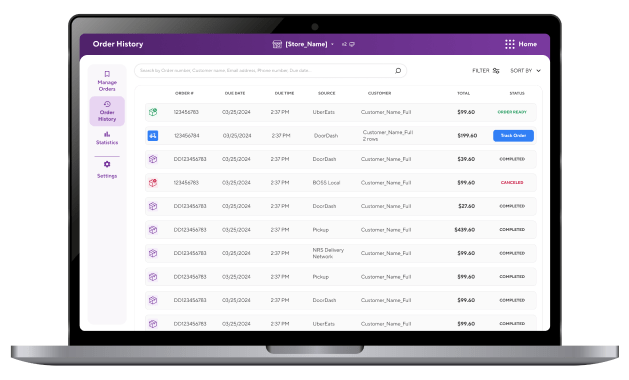
Order History
View, search, and check delivery status on all completed orders and open orders awaiting pickup.

Order Management Statistics
View important metrics and statistics across your online sales channels.
Identify best performing platforms, revenue and top selling items. Get actionable insights to manage and grow your business.
DoorDash integration TODAY!
"*" indicates required fields
FAQs
Do I need a DoorDash account to integrate?
Yes, integrating requires a DoorDash account. If you don’t have an account yet, we can help you sign up for one when you contact us.
I’m already using DoorDash. Can I still integrate with my NRS POS?
Absolutely! Notify your NRS sales rep or your DoorDash account manager, and we’ll help sync your existing account so orders come through your POS.
What is the cost of the NRS DoorDash integration?
How do I connect my POS to DoorDash using this integration?
Inform your NRS sales representative; they’ll start the process, and DoorDash’s team will handle the technical setup. It takes about 4 weeks for DoorDash to fully integrate, as DoorDash is cataloguing your items.
How do I manage DoorDash settings, such as store hours or menu items?
Menu items/prices/availability sync from NRS; specific DoorDash operational settings are managed in the NRS Order Management platform.
